Showing posts with label website. Show all posts

Wednesday, July 26, 2017

A-B Tests - Which Color Combo Do You Like

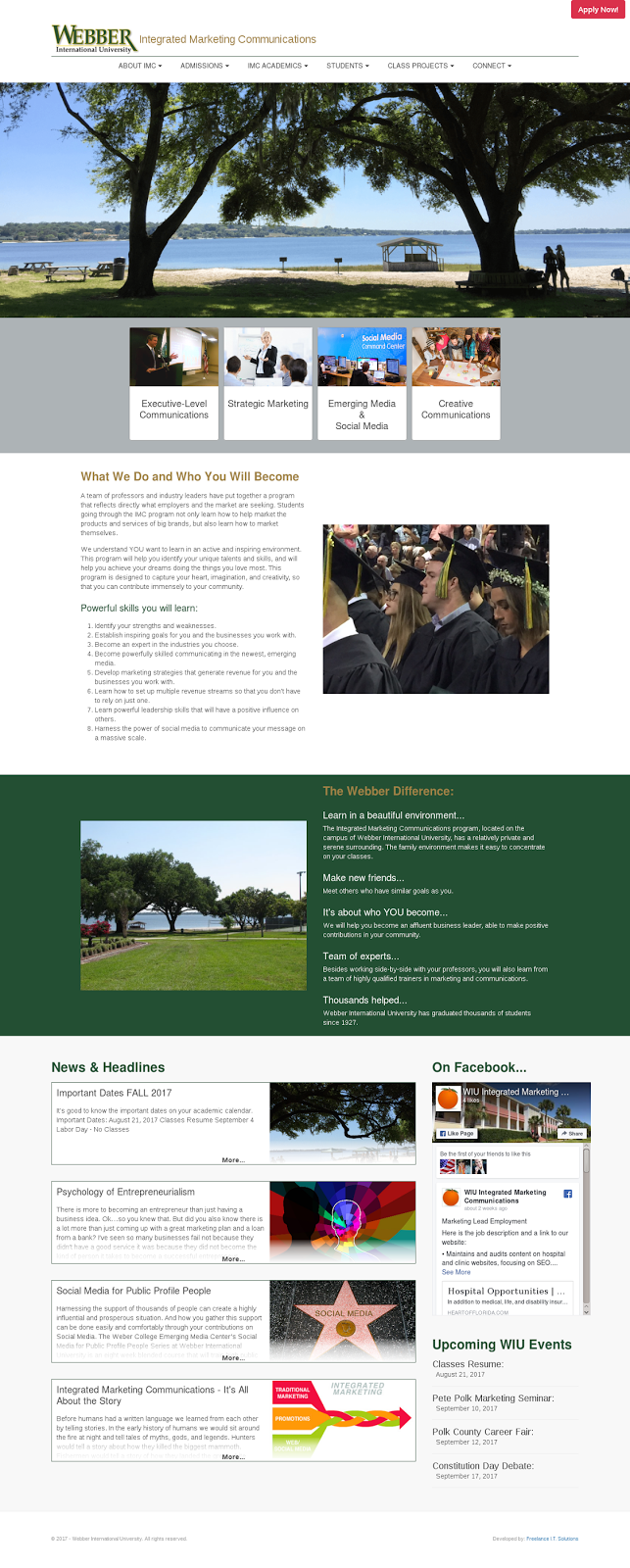
We would like your help.  A client is unsure of the color combination they would like on a new department-centered website.  Their organization has a standard color guide for all print and online material.  But, they may deviate since they are a 'stand-alone' department.  This has lead to the following:
  • Example A: In this image you see the site with a new set of primary colors, orange and green.  These are the colors that will represent the department.
  • Example B: This image uses the standard colors of 'gold' and green (note, the green is a darker shade of green). The gold and green are the university's colors.
Please compare the two and let us know which you prefer.  Please feel free to add comments about why you've made your choice. (Click images for larger view).

Example A
Example B

Monday, June 19, 2017

Some Nice Text Messages from Clients

Recently, a marketing guru (who does some consulting for us occasionally) contacted us to create a new website for his business.  And, of course, I said, "yes!"

The site is live, but I am still making additions and tweaks.  And last week I got some nice text messages from Prof. Weber... it's always nice to hear from clients when they like the work I'm doing!

After returning from a short vacation, Prof. Weber saw the site after a week's worth of changes.  This response after he reviewed the site certainly made me smile!  (Yes, the text came through in the middle of the night... many of my client's know, I don't sleep).

Then, a little later that day - after the sun came up and I had made a few requested changes, I got this text!

Best he's ever seen?? Well, okay :-)

The site is based on the WordPress framework with a custom built theme.  It includes integration of the following plugins - some created by me just for this site, some open-source and customized, and some off-the-shelf:
  • Appointment Calendar (customized)
  • Captcha (customized)
  • FITS Round-About Slider (created for client)
  • Google Analyticator (off-the-shelf)
  • Landing Pages (customized)
  • Ninja Forms (off-the-shelf)
  • Super Socializer (off-the-shelf)
The theme I created is responsive - works on desktop, tablet, and smartphones.  You can visit the site here.

And from another client:


This is for another WordPress site.  I struggled quite a bit creating and customizing the child theme for this site.  The parent theme the client chose did not follow WordPress standards and was, at times, frustrating to work with.  But, it had some really nice effect and we wanted to use it.  After getting a text like this... the struggle was worth it!

The site includes the WooCommerce shop plugin and a custom sidebar plugin I created.

This site is still a work in progress.  So, much of it has "under construction" messages and the shopping area is filled with demo (fake) product listing.  But, the effects are working and the images and layout customization is complete.  You can visit this 'work-in-progress' here.


If your are looking for a new website or need your current site overhauled, please use this form to contact us for more info - consultations and quotes/estimates are always free! If you have a good idea of what you want, you can use this form to start the quote process now.  If you'd like, you can also comment below.  Your contact info will not be displayed in the comments.

Thursday, March 2, 2017

March 2017 Special - It's a Redo!

Our February special was such a hit that we decided to do it again for March!  So, if you liked it last month and missed out... here's your chance again! Get 20% off the development of a custom mobile application when paired with the development of a website or web application!


Contract with us in the month of March to create a new website or web application and get a 20% discount on the development of a companion mobile application.

For more information, contact us at questions@freelanceitsolutions.com
If you would like to get a quote for your project, you may start by using this link.  We will review the information and get back with you within 24 hours.

Also, visit the website for a look at out portfolio and testimonials.

Thursday, February 2, 2017

February 2017 Special - Web + Mobile and Save

For February 2017, get 20% off the development of a custom mobile application when paired
with the development of a website or web application!

Contract with us in the month of February to create a new website or web application and get a 20% discount on the development of a companion mobile application.

For more information, contact us at questions@freelanceitsolutions.com
If you would like to get a quote for your project, you may start by using this link.  We will review the information and get back with you within 24 hours.

Monday, January 16, 2017

Google Starts Warnings for Non-Secure Info Collection

If you have a website or manage a website, take note!  If your users are using Google Chrome when visiting your site, and they land on a page that asks for a password, social security number, credit card or other sensitive data, they will begin receive a warning message.

These warnings are the first steps in Google’s plan to make all pages that collect sensitive information use a secure protocol (HTTPS).  Along with this, Google will begin ranking pages with SSL Certificates higher then pages without (even if those pages do not collect information through forms).

How do you make sure your visitors don’t see these messages?  You can purchase an SSL Certificate for your domain.  Install the certificate to protect the whole site, or just the sections / forms that collect the information.  If you are going through a third party for login or to process payments, make sure those sites use SSL.

For more information about SSL Certificates, visit our "SSL/TLS Explained" page.  Comment below with questions.

Monday, December 26, 2016

For January 2017 - WordPress Specials!

For January 2017 we are offering special prices on our two best selling WordPress packages - the Basic Template Plan and the Basic Custom Plan!

For just $900 (you save $300) the Template Plan allows you to choose from 11 template and we will customize the template you choose with your logo, images, and copy.  This package includes social media integration, SEO, and more... full info here.

If you are looking for a custom WordPress site, our Custom Plan gives you a custom WordPress site for only $2400!  (Your savings on this package - $600)!  The site is totally designed, top to bottom, to meet your brand standards - no templates here!  This plan also includes social media integration, SEO, gallery/video pages, and more... to see all the package includes visit our WordPress page.

You can contact us online for more information.  But, if you are ready and would like an estimate for your project, please fill out this form.  Also feel free to ask questions in the comments section below.

If we can start your site in the first week of January, you could have your new site by the end of the month!

Parallax Effect on New Website

As I look back on the blogs from 2016, I realize there are way too many blogs on marketing issues and not enough blogs on coding, cool effects, functionality, and apps.  So, I'm going to close out 2016 with this blog on the parallax effect developed for a new site I'm working on.

If you are unaware of the what the 'parallax effect' is you can visit the proof-of-concept page I did for the new client at http://fitness-365.com/fitness-365-parallax.html.  The parallax effect is when you create an effect where the page content (the words) scroll by faster than the background images.

Not only is this effect pretty neat, it has the ability to build emotional awareness of your brand (by drawing attention to the background images) at the same time it is being very informative (through the content).  Additionally, it encourages the visitor to continue scrolling to the bottom of the screen - something that is important if you have more information to present than can fit above the 'fold.'  (The fold is considered the bottom of the visible area when the site is loaded in the browser.  'Under/Below the fold' is what becomes visible when you begin scrolling down).

This is a cool, fun effect that when used properly can really enhance your website.  Check out my implementation for "Fitness-365" by clicking here.  And please let me know what you think in the comments.

Special Note: this proof-of-concept is NOT responsive yet.  So, viewing on small screens may not offer the full effect.

Wednesday, June 8, 2016

June Special

For June 2016 ALL SERVICES are 25% OFF!  Yes, custom websites, WordPress sites, mobile applications, SEO/Analytics packages - EVERY SERVICE 25% OFF through June!*

How it works:
1) Contact us for a quote.  Tell us what you need - DO NOT tell us that you know about this special.

2) We will send you a quote for your review.

3) If you would like to proceed with your project, give us the promo code JUNE2016 and we will take 25% off the quoted price.  (If you don't remember the code, it's really not a big deal, just tell us where you saw this post).

*Mix and match our services.  You will get 25% off everything.  This offer is not good for current projects, new projects only. 

Start Now!
 

QoftheWeek - What's Most Confusing About Website Builds

This week I'm wondering what confuses you most when it comes to having a website built (or rebuilt)? Is there a term, a phrase, or technology that you find confusing or maybe even a little scary? Please let me know what it is in the comment section.

Besides compiling all the answers as usual, I will also try to explain the confusing material.

Results from the last QoftheWeek: Have you ever used a DIY website builder? Well, believe it or not, this is the first question that we had NO answers for. Maybe those platforms are not as popular as the commercials would have us believe. Here's the link to that question, if you'd like to answer in now.

Wednesday, April 6, 2016

Google Ranks Secure Sites Higher


Recently Google announced that they have begun giving preference to sites that use the HTTPS protocol – this is the secure version of the more common, HTTP. Google is doing this because the process of obtaining the security certificate to use HTTPS (an SSL Certificate, more on that later) involves some research and vetting of the company / person applying for it. (Although maybe it's because, secretly they invest in companies that supply the certs – where are all the conspiracy theorists*??)

This HTTP / HTTPS / SSL stuff might be causing some confusion. So, here is something that will help … at least I hope it helps.

HTTP and HTTPS, What are They?

HTTP stands for Hypertext Transfer Protocol. It handles the formatting and transmission of data between the Web server and your browser. HTTPS is a secure version of HTTP – that's what the “S” means. This version of HTTP encrypts the data moving between your browser and the server.

What is SSL

SSL stands for Secure Socket Layer. This is a protocol that creates a unique key and uses it to encrypt and 'de-encrypt' information being sent between two computers. The encryption code is shared between only the sending and receiving machines, making it very hard for a third party (machine) to figure out what is being sent back and forth. This is why websites that gather and send payment information often implement SSL. (In some states, the use of SSL is required for sites that collect credit/debit card info, Social Security Numbers, or child information).

An SSL Certificate is a digital signature that says, “this owner and/or domain have been checked out.” Installing an SSL Certificate on your website is what gives you the “S” in HTTPS. Note that the HTTPS protocol can be forced on a website without a valid SSL Certificate. But, the major browsers will popup a nice big warning letting you know they can not verify the security. If you really trust the site, you can bypass this warning. But make sure you really trust it before entering any personal info!!

Getting a Certificate

You can purchase a Certificate directly from a company like Network Solutions, DigiCert or RapidSSL. But, I highly recommend that you ask your developer or hosting company for help. They may charge a little to get everything set up. But, this charge will be less painful than trying to get this all together yourself! Also, many hosting companies offer a service with includes the purchase of the certificate, installation of the certificate on your domain, and the changes that are required to go from the HTTP to the HTTPS protocol.

There are three different types of SSL Certificates. They involve different levels of research/investigation into your business and domain (none are intrusive and this research takes place behind the scenes, except for a few emails you might receive).

First is the Extended Validation Certificate. It checks the right of the applicant to use the domain that will be protected and the certifying company conducts a thorough and detailed vetting of the organization represented by the site.

Next is the Organization Validation Certificate. The authorizing company will check the right of the applicant to use the specific domain name and will also check into the organization represented by the domain or the company that owns the domain. This check is not as thorough as the check for the Extended Validation Certificate.

Finally, there is the Domain Validation Certificate. With this type of certificate, the applicant is checked to make sure they have the right to use the domain covered by the certificate.

All this information is available to your visitor / buyer when they click on the Secure Site Seal. **I highly recommend that you have your developer put this seal and link (provided by the authorization company) on your site in prominent locations, such as the home page, cart and checkout pages, or form pages that collect personal information or information about children.** If you are on a site where you are asked for any of this kind of information, you may want to click on the seal to see what kind of certificate the domain has.

Why So Many Different Prices?

Prices can very greatly for SSL Certificates. Factors effecting price:
  • the issuing company for the certificate.
  • what level of compensation you want if the data is stolen during transmission.
  • what the certification covers – a single domain, the domain and its sub-domains, or multiple domains.
  • the number of years you purchase the certificate for (most certification companies now allow you to purchase for multiple years).

Another things that may increase the price is the cost charged by your developer / host provider to install the certificate for you. If working with your developer / host provider, I recommend you ask for an itemized list including the cost of the certificate type, plus the cost of the 'add on' features, and the cost of their services and assistance.

Some Final Notes

Watch your site - when your certificate is installed and takes effect, there may be links to other pages, sites and images that are broken. Also, make sure your developer / host company sets up your site to automatically go to HTTPS even if someone types or uses a link that still has the HTTP protocol specified.

It is worth remembering that with the cost of an SSL Certificate, you are not only providing assurance to your visitors, you are protecting yourself / your business, and you are helping your Google search rankings!

It is my hope that this post helps you understand HTTPS and SSL. If you have questions, please feel free to comment here or ask questions on Facebook, Google+, LinkedIn, Twitter, or any other social media site you came here from.  You may also ask questions using the contact form on our website.

*This line is a joke, please no comments about it.

Thursday, March 24, 2016

10 Spring Cleaning Tips


Spring... A time for renewal. A time for new flowers, leaves, grass. A time for... yes, cleaning. Not your house or garage - well, maybe they need it too, but I'm talking about your website. Doing some 'Spring cleaning' on your website is not only a good idea, it is critical to search engine optimization and customer retention. Here are 10 tips to help you get started with your website Spring cleaning.

1) Clean up, optimize, and change images. It is important to keep images fresh. New images can rejuvenate a site – make it look new and different. Images grab attention and with new images you can grab the attention of even regular visitors to your site. Also, pictures can become dated – hair styles, cars, and furniture can show the age of an old site. And old images may give the impression of neglect.

Images should also be optimized to reduce load time – something that can really effect how fast your pages load.

While you are reviewing images, you should also work with your developer to review the 'alt' and 'title' tags used with each image. The values used with these tags can effect search engine results.

2) Figure out which pages are performing well and which are not. Using analytics, check to see which pages are getting the most hits per month and which are getting the least. Are those least visited pages necessary? Can they be re-purposed? If they are important, maybe reworking them (images and copy) will help to boost their visits. This can create a better user experience and boost your ratings with search engines.

If pages like your 'contact' page are not getting hits, try adding call-to-action buttons to other pages that encourage visitors to request more information.

3) Check for broken links. Broken links have a big negative effect on your search engine rankings. And they are really annoying to your human visitors. Pages may have been added or deleted from your site. Are you sure that all the navigation and reference links throughout your site were updated?

It's also important to check the links to external web pages. Are the links still good? And if the links do go somewhere, are you sure those pages are still relevant?

4) Have your developer check for old code. In the past few years there have been many changes to code that can speed up website loading and response times. Studies show that users begin to lose interest in about 13 seconds. Ask your developer if any of the code can be “minified.” (He / She should know what that means).

Images can slow down a site dramatically. In most cases, there is no need to have images load below the viewable area in the browser. There are a few new methods that will load the images only as the page is scrolled and they are needed.

5) Refresh the description for products and services. Your products and services may not have changed. But, the words and phrases people use to search for them may have. Review the descriptions you use for your products/services. Make sure they include the most used search words and phrases (those keyword and phrases you're always hearing about).


6) Evaluate your product offerings. Are there products or services that just don't sell online? You may consider removing them from the site to help streamline the website as a whole. Or you may consider reordering things on catalog listing pages, moving your best selling products to the top. Or highlighting the best selling services on your home page.

If these poor performing projects/services are your highest margin offerings and you would really like to push them, can changes to their descriptions and images make them more appealing? Consider special offers and call-to-action buttons on other areas of your site to highlight these products/services.

7) Can you improve navigation. As mentioned before, visitors begin to lose interest in about 13 seconds. If they can't find what they are looking for easily, they will quickly lose interest and leave. Your navigation system should be smartly thought out. Your most important links should be in the main menu (usually at the top of the page). If you have more links than can fit nicely in the main menu, consider a secondary menu in a sidebar or in the footer – both common areas to find larger menus.

Also, if you decide to use drop-down or popup menus off the main menu, pay attention to the number of items and their order. The most visited pages should be listed at the top. Likewise, list your best selling products or services in the most prominent places in your navigation system.

8) Review links to your social media pages. Marketing through social media content is more important than ever. Internet users are much more likely to follow you on social media than to visit your site. Make sure that visitors to your site know you have a presence on their favorite social media site(s). Place social media icons in an easy to find area of each page. Make sure the links are valid. Social media sites often change their APIs. Make sure your “like” and “share” links for those sites work correctly.

9) Review your “About Us,” FAQ, and “Contact Us” pages. Does your “About Us” page include the latest information about your staff and your company? Are all the questions and answers on your FAQ page still relevant? How about the information on your “Contact Us” page?

Making your business more personable is a proven way to impress and win over clients. Put some thought into what you say about your business and your staff on your “About Us” page. Replace 'cold facts and history' with a story-like presentation. Show friendly pictures of your staff at work.

Don't let the FAQ page become bloated. This slows down performance and makes it more difficult for users to find the information they need. Remove all Q and A's that are no longer relevant. If your list is still long, try some different presentation methods and search options to make it easier for the user to find what they are looking for.

Does your “Contact Us” page have the latest information on how to contact you? Are contact forms streamline and do they work? Are all the fields relevant? Visitors are more likely to use your form if it is short and does not ask for too much personal information.

10) Streamline checkout. If your site uses a shopping cart checkout or if you allow clients to pay online, make sure this process is as streamline and simple as possible. For example, if you ask for a fax number, remove it. In 2016, it's just not needed any more. If you have separate areas for billing and shipping addresses, there should be a simple way to auto-fill one after the information is entered in the other. If you already have a button or checkbox for this, make sure it works.

When making a purchase, users expect to have to provide more information. But, this process should be as easy and quick as possible. Your visitors may put things in their shopping cart and intent to purchase. But if your checkout process is frustrating or too long, they are likely to leave. Online users have come to expect 'easy and quick.' If your process is to frustrating and long, they will go to your competitors.

A few small changes, some review time, and some quick checks can revitalize your website and your visitors experience. It's worth a little 'spring cleaning' time!

If you have questions about any of these (or other) items, please feel free to comment here, contact us on Facebook, or visit our website - which might need a little Spring cleaning too!

And if you are looking for a fresh new website this Spring, check out our March WordPress Specials!

Thursday, March 17, 2016

March Specials

I've fallen behind on my blogs.  With all the absences (both planned and unplanned) in the office and the equipment upgrades we've been doing, there just hasn't been time for the "luxury" of social media and blogging.

But, things seem to be getting back to normal, so I'll be getting back to blogging this month!

I did want to post the March WordPress Specials here - we are only halfway through March.  So, there is still time to take advantage of these great deals!  For more information and to see demos, click here.

Sunday, January 10, 2016

Launching a Killer Website


Your website should serve many functions and will probably have many parts. A website can mean so much to your business, it should be a serious undertaking – have a dream, plan, design and develop, and debug. While your website can be and do many things, it should have one primary goal. That goal might be to generate leads, sell products, educate visitors, establish your company as a solid leader in your industry – whatever it is, that goal should be the focus through the design and development of every part of the site. Below are four guiding principles that can assure you have a killer website!

(1) Create Pages that Engage Readers Quickly
According to a study by Entrepreneur.com, the average first-time visitor to your site will judge your website in about two-tenths of a second! Within the next 2.5 seconds they will confirm that judgment. If it's negative, they're gone.

For many potential clients/customers, your website will be their first impression of your business. They should see a clean, organized site. Navigation should be easy to find and follow. And your site should be unique – a reflection of your brand. These strategies will help keep visitors on your site, retaining readers and possibly turning them into clients/customers.

  • Grab Attention with Large Images - It's no secret that images grab attention. A large, quality images will grab attention and quickly convey your message and your site's purpose. More companies are using large photographs or even page wide videos as homepage backgrounds.

  • Keep Text Short and to the Point - If Entrepreneur.com is right, you have less than three seconds to grab your visitor's attention. Long paragraphs will only discourage them from reading further. Keep your message short and clear. Use bullet points if necessary, but don't have long lists. Have a clear call-to-action link or button - “get the demo,” “buy now,” “request a quote” “get our newsletter.” Your call-to-action will depend on the goal of your site or page. But, there should be one on every page and it should be prominent.
 
  • Be Smart with Colors - Color can increase brand recognition. Think about a Coke can. You probably will recognize the red can as Coke even without seeing the logo. And in the store you quickly recognize the difference between Pepsi, Diet Pepsi and Pepsi Max just be the color of the cans/bottles. Large companies spend a lot of money on research before changing colors associated with their products. You should put some serious time and thought into your colors – what colors will be complementary and work well together? What colors will appeal to your target audience? Which colors complement the emotion you are trying to associate with your brand?
  • Use Flat Design – Specifically Flat Design 2.0 - Even if you don't know what 'flat design' is, you probably know what it looks like. Since the introduction of iOS 7, iPhones and iPads have been using a flat design. And Windows 8 through 10 all use a flat design. It is the absence of drop shadows, textures and gradients. and the use of easy to read fonts. The 2.0 version of flat design uses light shadows, highlights and layers to give elements a little bit of depth. Also, you might find some elements (buttons for example) that will use a slight gradient.

(2) Be Responsive
While I have heard (pretty good) arguments that some business types do not need mobile ready sites, the fact is that mobile use is rising every year. In 2014, mobile internet usage overtook desktop usage. A Yahoo study showed that consumers spent 47% more time on mobile devices in 2015 than in 2014. Facebook reports that more users access their site from mobile devices than from desktops.
 
This all means that potential clients/customers will likely browse your company website from a smartphone or tablet and your site should be ready. Visitors who encounter sites that are not mobile friendly will likely get frustrated and form a negative opinion of your company. When visitors leave your site quickly it can increase what is know as the 'bounce rate.' And this can effect your ranking with search engines.

Fortunately, there is something called Responsive Design which allows your site to adapt to the different screen sizes of different devices. Responsive design means one site can work for the desktop, tablet and smartphone. Make sure your new or revamped site uses responsive design.

(3) Your Website Should be the Center of Attention
It is a good idea to have a business account and page with the major social media sites – Facebook, Google+, Twitter, LinkedIn, etc. But your posts and status updates on these sites are just little pieces of your business – tiny morsels to wet the appetite of your potential clients/customers. Your social media posts should always point visitors to your website. This is where you will make the biggest impression.

Use your website to engage your visitors. Use blogs, photo galleries, videos, and forums to showcase projects, show your knowledge in your field, and provide customer service. Engage in real conversations with your visitors. Encourage clients/customers to share reviews or testimonials – consumers are more likely to shop on sites with personal recommendations.

All of this content and engagement will also improve SEO. Content provided by you and your clients is likely to contain keyword phrases that will help your search engine ranking. And search engines rank visitor-generated content high. Use forums, Q&A sessions, and service conversations to keep visitors on our site longer. Share links to other areas of your site as often as possible to get visitors to explore.

Your website is the most valuable piece of real estate your business has. You have full control over everything about it – use it wisely!

(4) Make It Flow
Easy site navigation was mentioned in (1) above. But, it's important enough to get its own number! If visitors can't find the information they need easily, they will leave your site. And the bad news is, they won't have the patients to look for long. You and your developer should put
serious thought into the flow of your site – which pages should get prime menu space? Which pages should be placed in dropdown or slideout menus? Which pages should be placed in secondary menus in sidebars or in the footer?

When considering how to best set up your site's navigation, consider your business type and your audience. Is there a structure that is standard for your business type – something your visitors will expect? Again, if your first-time visitors cannot find things where they expect, they won't look for long. There are other businesses that have the same products / services. If their sites are easier to navigate, they will likely capture the business. It is always important to remember, even if your site looks great, if the visitor can't find the info they are looking for, you've missed the bulls-eye.

Your website plays a significant role in building your business and your brand. Whether this is your first website or you are re-launching a site, you must spend the time and (yes) money to do it right. If not, you are missing out on the most influential marketing tool you have.

For more information on building great websites and mobile apps, visit our website at freelanceitsolutions.com.  Or contact us here.

Monday, November 4, 2013

mCommerce – Why You Should Have a Mobile Site


mCommerce infographic
Click for larger view.
mCommerce – sales that take place over mobile devices like smartphones and tablets, is steadily increasing. In June of this year, 55% of all online sales originated on smartphones and tablets. And 71% of those polled said that their purchases, both online and brick and mortar began on a mobile device; this includes research of products and pricing, research of businesses that sell the products, location searches and on-site product price comparisons. What does all this mean? If you do not have a mobile presence, you are missing out on sales!

There is good news... getting a mobile presence does not have to be expensive and there is still time to get something set up before the holiday season!

Yes, developing a dedicated phone or tablet app can be expensive. But, in a recent survey, responders said that they prefer shopping on mobile websites rather than dedicated apps. And developing a mobile website does not have to be expensive because you have options.
  • Redesign your current site using the 'responsive web design' model. The responsive web design model uses techniques that allow you to create one site that works on many screen sizes. In the long term, this is probably the best idea for most businesses. But, it's the most expensive option and requires the most time.
  • Create a dedicated site for 'small screens' – those of smartphones, tablets, and phablets. (Phablets? A phablet is a device that has a screen larger than 5 inches but less than 6.9 inches – smaller than this is a smartphone and larger is considered a tablet. A popular example of a phablet is Samsung's Note III smartphone). If you want a site ready for the holiday season, this is your best bet. It is also less expensive than a complete redesign of your website.
  • Your final option is to do nothing and hope your site looks good on the plethora of connected mobile devices out there. But, unlike the early days of mobile websites, users are not willing to put up with sites that don't render well on mobile devices. Is this really a good option?

What does all this and the numbers in the accompanying infographic really mean? It means if you have a business that targets public consumers, you need a mobile presence. Mobile devices are getting more and more popular – they are currently outselling both desktop and laptop/notebook computers. Can you afford not to be in front of the customer's eyes when they want your product? The answer to that has always been NO.

Please contact us if you want/need a mobile friendly web presence: http://www.freelanceitsolutions.com

Please see infographic for sources.

Monday, June 24, 2013

Understanding Web Development Jargon, Part 1 – Domain Name / Hosting / Website Development

In this series of posts, I hope to remove some of the mystery of getting a website up and running, as well as explain some of the jargon associated with websites. I plan to add a post in this series each week for the next few weeks. You are welcome to comment with questions, observations, etc.

Often when working with clients that are new to the whole website thing, we find that there is a lot of confusion on what it takes to get a website up and running on the Web – and even with clients that have worked with other developers in the past, there is often confusion.

This post will (hopefully) clear up what it takes to get a website up and running and viewable by the public. (These steps can actually be completed in any order. But, the order presented here is what is most often used).

First – purchasing the domain name. The domain name is what people type in their browser to get to your site... the .com thing (or .net or .org or several others – we'll get into that in another post in this series). You must purchase a domain name from a licensed registrar. The cost is usually around $9 USD to $12 USD for one year. (This can change greatly depending on the registrar you use. So, shop around). People often think that once they've purchased the domain name, they are ready to go – but they are not.

The domain name is only a name. It can not 'hold' a website. The domain name is just a 'title' that will later be used to tell computers where to go to view your actual website.

Wait a minute, wait. a. minute. We've already introduced a new term while trying to explain this one. What is a 'registrar?'

A registrar is a business that is licensed by the group that governs the Internet. They gather the information needed to register a domain and maintain a database of that information. That database is available to all other registrars and the governing body. The information that is collected – the domain name (obviously), the name and contact information of the person registering the domain name, and the length of time you will own the domain name. Some of the more common registrars are – Network Solutions (one of the first and most expensive), GoDaddy.com – you've probably seen their commercials (mid-level in terms of cost), and NameCheap.com (one of the least expensive).

You do not get your domain name forever. You must renew it – usually on an annual basis. But, you may purchase it for multiple years as well.

Second – host (a.k.a. host provider). When you hear developers talking about hosting, they are referring to space on a server where a website is stored. The host is the company that owns the server. And the hosting fee is the cost of renting the space on the server. The host can be the same as the registrar. Both GoDaddy.com and NameCheap.com will host websites for the domain names registered with them – for an additional fee. Fees paid for hosting are usually paid on an annual basis, although some hosts will allow for shorter lengths and most will allow for longer. And the fees can vary greatly, so again, shop around. And ask for explanations when they are more expensive – they may include extra services.

Normally, your host will also provide you with email addresses that use your domain name (address@yourdomain.com). If you think you are going to have a lot of email addresses, it's important to ask your host how many email addresses you get for the cost of hosting and how much each additional address will cost. Some providers will have limits, some will not. (Note here that some registrars also offer email services. If your host provider does not offer email services, this is an option. But, I would recommend using your host providers service when available. It makes everything easier for the setup of your domain and service. This has to do with technical stuff that is beyond the scope of this post).

Third – web development. This is when all the pretty stuff that people see and some behind the scenes stuff they don't see is created. Here again, there are options. If your needs are simple, you can create your own website using templates – often available from your registrar. Also some host providers will offer template programs you can use to set up your site. These programs will walk you through the creation of your site in steps that are supposed to be easy to understand – but often are not.

If you want a truly modern, interactive site you should contract with a developer or development company. A web developer will work with you to create a unique site (or at least it should be unique... if he/she/they are just using a template, are you really getting anything you couldn't do yourself)?

A good developer or company will discuss your needs, the impression you would like to give, and your target audience with you. A good developer will also help you to understand all of the above info and more. He/She will help you understand your responsibilities in the development process and explain to you what they are doing as they work through your project.

When choosing a developer, it is good to remember the old adage, “buyer be ware.” But, it's also important to remember, you often “get what you pay for.” You should ask to see the developer's portfolio and even ask for recommendations. Do a little research – look at their Facebook page, check Linked In for reviews, etc. While no company is going to make every single customer happy, you should see overwhelming good comments compared to bad before deciding to contract with a developer.

Finally, your developer can be local – someone you can meet with in person, someone on the other side of the world, or someone somewhere in between. The internet and telephones are global. There is no need to settle for someone you don't feel comfortable with or who can't provide the service(s) you want.

If you have any questions, comments, etc., please feel free to use the space below or contact us at questions@freelanceitsolutions.com. We will be happy to help you.

And by the way, Freelance I.T. Solutions offers all of the services mentioned here. ;-)

Tuesday, May 18, 2010

Why Small Businesses Should have a Website

A website is the most cost effective advertising media you can have as a small business owner. There is just no other media which allows you to reach as many people with exactly what you want to say.

Finding an expert to walk you through the process and develop your site is no longer difficult either. There are many individuals and businesses that can develop a professional looking website for you – just search the web for them!

Here are seven reasons you should have a website – no matter what size your business is.

Educate / Inform
One of the main reasons people use the Internet is to learn about products and services before buying. Your site could include a short company history, information about your staff / management, interactive maps to your location, testimonials from satisfied customers, hours of operation, and more. Your site should include a listing and description of your products and services. Websites are unique in the world of advertising media because you can include as much or as little information as you'd like – there are no size limits, circulation limits or image limits.

A well planned, designed and laid-out website will foster trust in your business before your customer calls, visits or purchases.

Your 24/7 Employee
Your website is working even when you are not. It is always available – days, nights, weekends, holidays... always.

A website allows you to provide your customers with the information they want without interacting with a person. With time being such a premium thing these days, this is a benefit to both the customer and you.

Including a frequently-asked-question section on your site is a great way to save everyone time and money!

Customer Communication
As mentioned earlier, there are no limits to what you can present on a website. A professionally designed site can tell your customers you care about them, they are important to your business – even without ever meeting them.

You can keep in contact with customers through newsletters and special offers. Keep track of customers and their purchasing habits with a customer tracking system. Track customer satisfaction with surveys. Using a good balance of these methods shows a customer that you are concerned about their experience – you are concerned about them.

A website also offers a means of consistently keeping your customers informed about sales, new products, changes in services, etc.

Lend Legitimacy to Your Business
A well designed, well functioning, impressive website gives a favorable first impression to your customers. It demonstrates an investment in your business and increases customer confidence, thereby increasing sales.

Well done, professional websites level the playing field – you may not be as big as the other guy, but your products/services, customer care, etc. are, and a professional website can show that.

Research Your Market
With today's analytical tools, you can discover a lot about your market and potential customers based on their web activity. It's possible to track the time of day you have the most visitors to your site, the areas these visitors are from (generally), what pages/products they are visiting on your site, and more.

You can include surveys, questionnaires, and other forms of feedback to discover whether or not your business is meeting the needs of your customers. Using these methods you can also anticipate trends in your industry.

Customers Expect It
People expect a legitimate business to have a website – period! Have you ever been asked (or asked someone else), “what's the web address?” If you (or your current customers) can't give a web address for your business, you just lost business!

It is also very likely that your competitors have a website. If potential customers cannot find a website for your business, it's likely you've just made a sale for one of your competitor.

Most Cost Effective Marketing Available
Many people turn to the web first when searching for a business or service. According to internetworldstats.com more people go on-line to find businesses than turn to the Yellow Pages and newspapers combined! The Internet allows you to reach local, regional, and international markets in a way no other advertising media can.

An Internet presence offers a better return-on-investment than any other media as well. The cost of developing a very professional website and hosting that site for a year is less than a “boxed” Yellow Pages ad, less than a quarter page, one week run in a local newspaper, and less than a 1000 color brochures. And after the initial development, your cost is even less each year. There is just no other advertising media that is as versatile and cost effective as a professional website!

One Exception to the “You Must have a Website” Rule
It's actually better to have no website at all than to have one that makes your business look bad. Your site speaks volumes about your business. It either says, "Hey, look, we take our business so seriously that we have created this wonderful site for our customers!" or it screams, "Hey, look, I let my 10-year-old nephew design my site. Good luck finding anything!"