Saturday, May 11, 2013

Appointment / Scheduling Application

Recently we completed an online appointment system, which is part one of a three part application we are creating for a client in Portland, Maine. 

The application is a secure, password protected system used by the staff to keep track of appointments. It also tracks client information and develops reports based on that information.

This application is highly customizable. Beginning with the same base code, we can build a similar, customized application for your business.


The image below is a close up of the left side of the calendar display. In this image notice the 'date control' buttons. The left and right button will move one day, week or month; depending on the current calendar view. If you are not on the current day, the 'today' button will take you there in any view. The 'go to date' button...


will bring up this calendar. You can use it to quickly go to any day or month in any year.


To create a 'new appointment,' simply click the starting time on the calendar. We can create a custom form to gather the information you need for your appointments. This image shows the form created for this client.
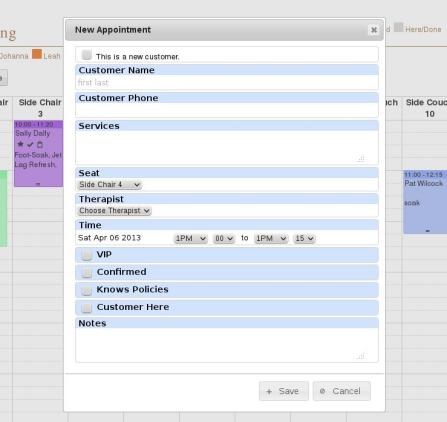
Clicking an appointment in any calendar view will bring up the 'edit appointment' form. Again this form can be customized to your needs. For this client, we pre-filled the 'new appointment' form. The form can be used to update/change any information for the appointment or also to delete the appointment.

Also notice in this close up image that the employees are each assigned a color. In the schedule, employees can quickly see which appointments are assigned to them. When customizing the scheduler application for you, colors could signify different types of appointments, different projects, different assignments – essentially, anything you need.

  In this close up view, note the four 'view' buttons. There are the three buttons familiar to most calendar systems – month, week, and day. (Screen shots of these views follow). Also notice the custom button 'seating.' This client needed to track appointments by their seating arrangement. Other possible custom view might be appointments by personnel, appointments by client type, or anything you may need.
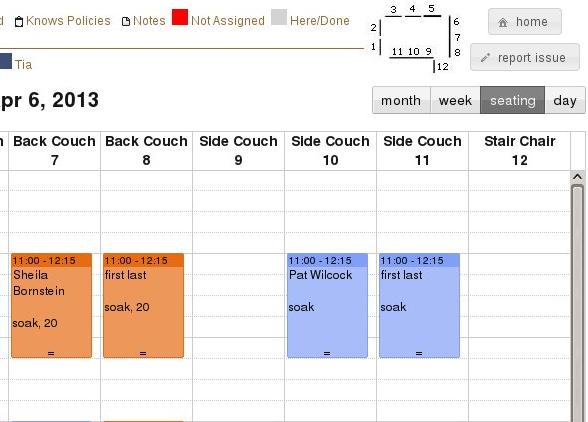
  As seen earlier, this is the 'seating' view for appointments. Business open and close time ranges can be set and, if needed, only those hours will be displayed. These hour settings are carried over to other views.

The 'week' view can be set to start on any day your business might use. For example, some businesses are closed on Mondays. In that case, this view can show the week starting on Tuesday. Another customization would be to remove weekends from this view.

When in the month view, the 'new appointment' and 'edit appointment' forms are available, as in the other views.


The 'day' view has all the same functionality of the other views.


In this close up image, notice the two, small lines at the bottom of the appointment. By clicking and holding, you can drag the end of the appointment up or down, changing the appointment ending time. You can also click and hold on the 'time header' of the appointment and move it. Doing this you can change the start time, the date, and (in this version) the seat of the appointment.

If you have a business that could benefit from an application like this appointment / schedule application, please contact Freelance I.T. Solutions by visiting our website or calling 407-259-2856.

Author: Russ Thompson (russ@freelanceitsolutions.com) - Freelance I.T. Solutions

Wednesday, April 17, 2013

SEO Tips for Image Optimization

A picture is worth a 1000 words... humans love to see pictures. We prefer pictures over text most of the time (which is why infographs are so popular, even when the don't tell us anything). And now, search engines love pictures as much as we do. Including the right information about pictures and images on your website can help boost your site in search results. Here are some tips to follow to take advantage of this feature.

1 – Use Keywords in File Names
It's pretty common knowledge that keywords are important in meta tags, page copy and URLs. It is less commonly known that search engine 'bots also look at image file names. Give your images descriptive names that are aligned with the copy / subject material on the page. A file name like “logo_75x75.jpg” tells the search engines nothing about your business or page subject. The file name “companyName_logo75x75.jpg” at least includes your company name and is one more thing for search engines to latch on to. It is extremely important that pictures of products have names that describe or match the product.

2 – Title Text
Have you ever noticed that when you leave your mouse over an image, often times a little message will pop up? This message is contained in an attribute called “title.” Search engines read these titles. Image titles should tell us something about the image/picture, but should also be related to the page copy. It's one more thing that 'show' search engines that your page is relevant to the search string being entered by the user.

3 – Alt Text
The 'alt' attribute is similar to the text attribute except that humans never see it unless there is a problem. 'Alt' stands for “alternate” and was set up to be used if an image could not be displayed. Have you seen words show up when an image does not load? What you see is the text in the alt attribute. Search engines use the information in the alt attribute to help determine what the image is about. Put a keyword or phrase in here that explains the image, is aligned with the page copy and is not the same as the title attribute text – it can be similar, but why wast the space on exactly the same text?

4 – Use the Right Images
Finding the right image can add a 'wow' effect to your page. Good images will encourage visitors to share your page and site – causing backlinks. Search engines like to see backlinks to sites. Backlinks mean people are finding what they are looking for on the site. This is very important to search engines because if their users are not finding relevant information through the search results, the users are going to try a different search engine. So, it's safe to say that a good image 'sells' your page.

It is also important to make sure your images are 1) owned by you, or 2) have public or Creative Commons licenses, or 3) are purchased for use on your page. Good places to look for images: Flickr, iStockPhoto, stock.xchng, and clip art catalogs. Or search Google using search terms like 'public license images' or 'Creative Commons images.'

5 – Images Should Match Page Content
The content or copy on the page should align with everything discussed so far – file names and URLs, meta tags, alt text, title text, and link text should all relate to page content.

A final note: do not over do it! Keep you keywords and phrases down to the essentials. Don't cram a lot of words and phrases into the tags and attributes in an attempt to score higher rankings. Too many words and phrases can 'confuse' the search engine bots and drop your ranking. Also, the search engine bots will only pick up so much and then the rest is ignored.

Author: Russ Thompson - Owner and Lead Programmer, Freelance I.T. Solutions

Wednesday, October 31, 2012

Banner Monsters Project

The Banner Monsters is a project we are currently working on with Pinscher Designs. While Pinscher Designs in doing the graphics for the site, Freelance I.T. Solutions is responsible for the 'Place Order' application.
The order application consists of a 5-tab form. This tab allows the visitor to choose the product they wish to order. Option drop-downs are populated on the fly depending on what product(s) are chosen.
The visitor enters contact information in this tab. The tabs can be navigated without loss of data. This allows the visitor to change information without the need for page refresh.
Here the visitor chooses production and delivery options. Again, the visitor can navigate between tabs without data loss. In this case, they may want to make changes to see how they effect price.
This tab summarizes the order and gathers the credit / debit card information. Notice here the grayed-out 'file upload' tab. The tab is visible, but unavailable until the order has been submitted and approved. This prevents the random and anonymous upload of files.

Monday, June 11, 2012

Tech Then and Now

On the left is a 5MB hard drive from 1956. And on the right is a 64MB Micro SD Card from 2006. The had drive from 1956 weighed more than a ton and was used in a 'super computer.'

Wednesday, June 6, 2012

May 2012 New Jobs Numbers

In May there were 133,000 new, private sector jobs created. A huge majority of those (93%) were created by small and medium size businesses. Businesses with 50 or fewer employees created 67,000 new jobs. Medium size companies – 50 to 499 employees – created 57,000. And companies with more than 500 employees created only 9,000. So, if you're looking for a job, try the local, small business first! *Source ADP, Inc.

Friday, June 1, 2012

Be Careful What You 'Like'

… as well as what links you share on Facebook. Your 'likes' and links may be used as endorsements for products, services and people without your knowledge. And believe it or not, you've agreed to this. Facebook calls this, “Sponsored Stories.” It works like this. A company (or individual – like a politician) pays Facebook to automatically promote their brand through Sponsored Stories. If you share a link that involves that company or its products/services, a Facebook algorithm (program) may post that as an endorsement for the company/product/service/person – even if that was not your intention. Likewise, clicking 'like' or commenting on someone else's post can be used as an endorsement as well. This might not sound so bad, until you find that your name, profile picture, location and other personal information can also be associated with your 'endorsement.' Also, the algorithm can not distinguish the difference between a joke, an endorsement, or a post that ridicules. I've shared links that were meant to ridicule a company, a service, a government decision or a politician. I certainly do not want that used as an endorsement from me! And, let's say a Facebook friend stays at a hotel and has a bad experience, then posts about it on Facebook. I click 'like' to agree with him – not to say I like the hotel. The algorithm only sees that as a like for the hotel and then uses my 'like' as an endorsement for the hotel – obviously not my intention. And this brings me back to, “you've agreed to all of this.” In Facebook's 4000-word 'terms of service,' down in the middle somewhere, there is a statement that says they can do this. By agreeing with the terms of service and creating your account, you've given them permission to use you, your likeness and your posts as advertisements and endorsements. Hmmmm – I think I stopped reading at 250 words.